# Find all adjacent nodes of a node until stop selected nodes are reached
**URL:** https://igraph.discourse.group/t/find-all-adjacent-nodes-of-a-node-until-stop-selected-nodes-are-reached/1049
**Category:** Usage
**Tags:** R
**Created:** [23 December 2021 13:56 UTC](https://igraph.discourse.group/t/find-all-adjacent-nodes-of-a-node-until-stop-selected-nodes-are-reached/1049 "2021-12-23T13:56:10Z")
**Posts on this page:** 2
**Page:** 1
### Author:  [@fpiumi](https://igraph.discourse.group/u/fpiumi)
#### Post date: [23 December 2021 13:56 UTC](https://igraph.discourse.group/t/find-all-adjacent-nodes-of-a-node-until-stop-selected-nodes-are-reached/1049/1 "2021-12-23T13:56:10Z")
Hi
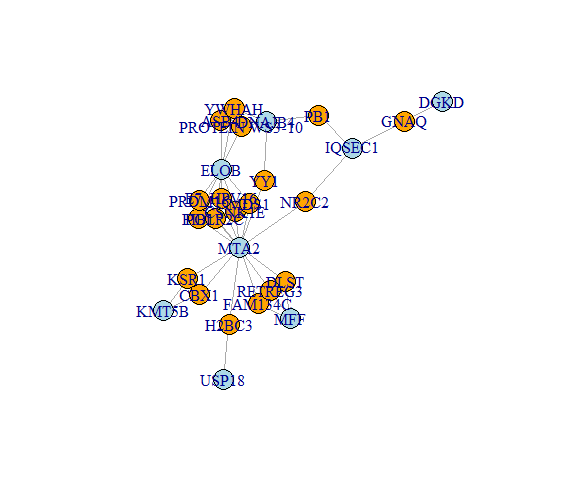
Please see the joined graph (png image).
I need to find all the neighboring nodes to blue nodes until the next blue node is reached.
For example, If I start from the “IQSEC1” node, I would like to have the following result :
```
IQSEC1 -> GNAQ -> DGKD
IQSEC1 -> NR2C2-> MTA2
IQSEC1 -> PB1-> DNAJB4
```
How can I do this?
---
### Author:  [@szhorvat](https://igraph.discourse.group/u/szhorvat)
#### Post date: [24 December 2021 11:45 UTC](https://igraph.discourse.group/t/find-all-adjacent-nodes-of-a-node-until-stop-selected-nodes-are-reached/1049/2 "2021-12-24T11:45:53Z")
I am not sure if there is a simpler way than writing your own graph traversal that stops at blue nodes.
You could maybe try something along these lines:
- Remove all blue nodes, except your starting point.
- Find the connected component that contains your starting point. You can use `subcomponent`. This gives you almost what you want, but without the terminating blue nodes.
- Take the union of the first-order neighbourhood of all nodes in this component. Select those which are blue. Add these blue ones to the component.
- Create the `induced_subgraph` of the nodes you collected. This should give the result you are looking for.